

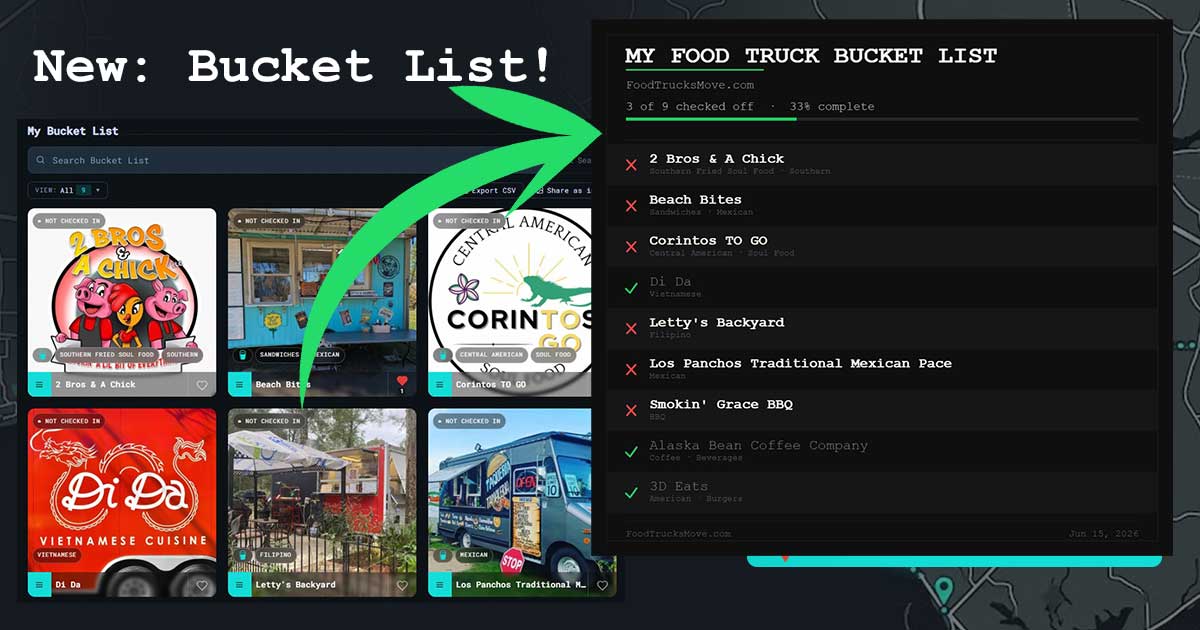
Introducing the Bucket List: Track Every Truck You Want to Visit
Your personal food truck to-do list, add trucks, check them off, and share your progress with the Gulf Coast food scene.
If you're anything like me, you've driven past a food truck on the side of the road, thought I need to try that someday, and then completely forgotten about it by Tuesday. That's exactly why I built the Bucket List feature, your personal and persistent food truck to-do list, right inside your FoodTrucksMove.com profile.
Here's everything it can do.
Adding a Truck to Your List
From anywhere you see a truck card, the Browse page, your Favorites, even the Featured section on the home screen, just tap the hamburger menu on any food truck card and select Add to Bucket List. That's it. The truck gets saved to your list, and a small bucket icon appears on the card so you can always see at a glance which trucks you've been meaning to try.
Your Bucket List Page
Head over to your profile and you'll find a dedicated Bucket List tab. Every truck you've added shows up here, complete with its hero image, cuisine type, and live status, so if a truck you've been eyeing finally checks in nearby, you'll know.
The page keeps a running count of how many trucks are active on your list. It updates instantly when you add or check something off.
Search and Filter
Got a long list? The search bar at the top lets you filter by truck name or cuisine type. There's also a View dropdown that breaks your list into three modes:
- All: everything, active and completed
- Bucket List: just the trucks you still need to try
- Completed: the ones you've already knocked out
Gulf Coast food truck community
Follow the fleet on Facebook.
Truck locations, pop-up alerts, and local food news straight to your feed.
Each view shows a live count, so you can see exactly where you stand.
Checking Off a Truck
Once you've finally made it to a truck on your list, open the hamburger menu on its card and hit Check off Bucket List, and the truck moves to your Completed view.
If you accidentally check something off, you can re-add it from the same menu and it'll move back to your active list without any fuss.
Export as CSV
Need to take your list somewhere else or share it with a friend? Hit Export CSV and you'll get a clean spreadsheet with each truck's name, cuisine types, and completion status. Nothing fancy, just useful.
Share as Image
Hit Share As Image on the Bucket List and the app generates a full 1080px branded image of your entire bucket list, a live progress bar showing how many you've checked off, and every truck listed with a green checkmark or a red X. On mobile, it pulls up the native share sheet so you can drop it straight into a text, a story, or a group chat. On desktop it downloads as a PNG.
The Bucket List is live now. Sign in, find a truck you've been curious about, and add it. There are a lot of great trucks out here on the Gulf Coast!